
Create an Employee
To create an Employee, please access Settings menu, select Employees tab and start adding new users.
To create new Employee follow these steps:
- click on Add Employee.
- Input user Name.
- Choose appropriate Permission group. Each user can be granted specific permissions in Octella account, to overview settings, access call recordings, chats, etc.
- Add an Extension number (if necessary).
- Press Save icon.
N.B.: Read an Article on Caller ID groups: TBC.link.required.TBC.link.required.

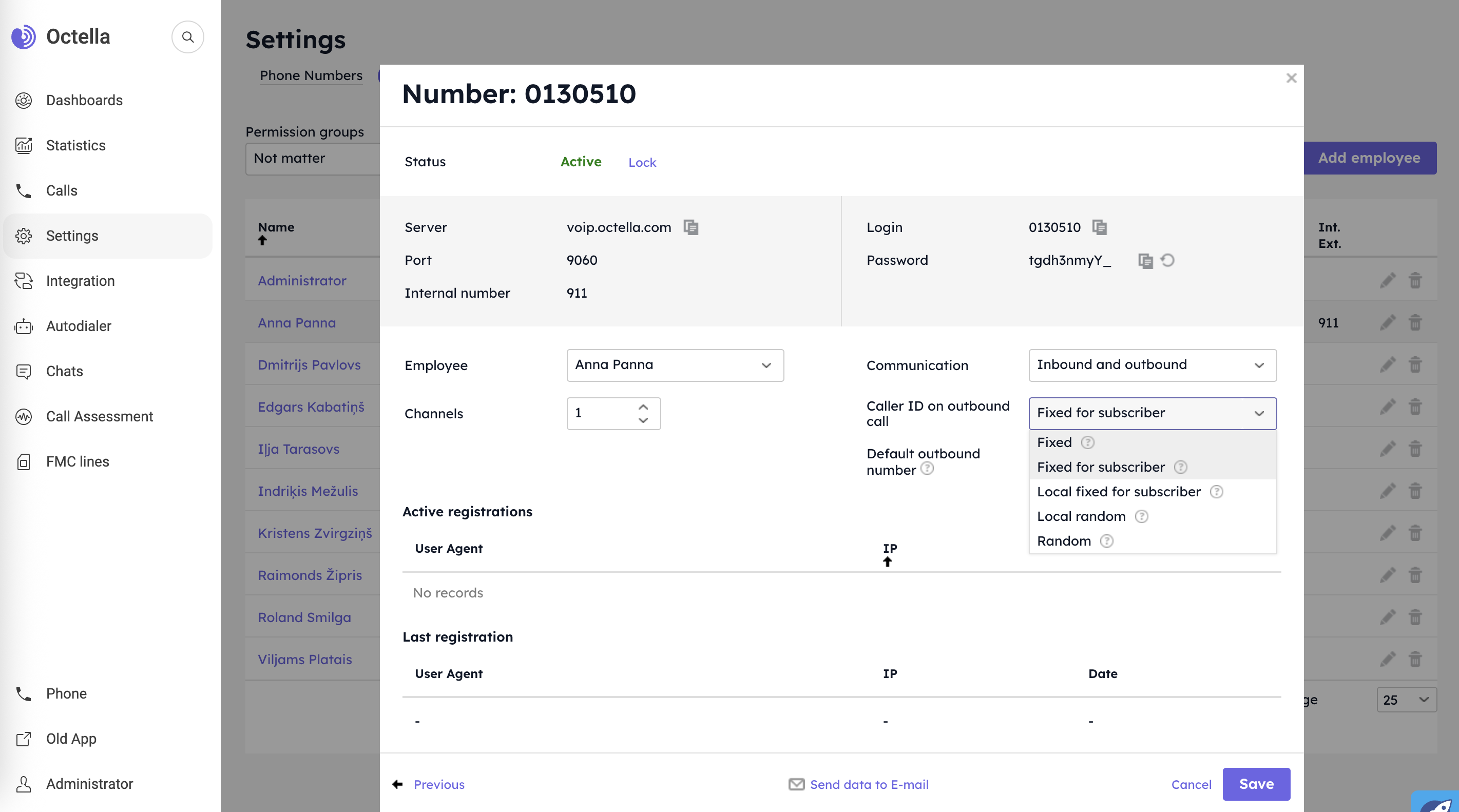
There are different business approaches for outbound calling. Octella supports various features for reaching out customers. By clicking on Employee's SIP Line (SIP device) you can configure following settings:
-
Communication. Choose the type of calls allowed:
⬇⬆ inbound and outbound
⬇ inbound only -
Caller ID on outbound call. Choose the most appropriate option to serve your business needs:
⚬ Fixed. The subscribers always will see the same selected number.
⚬ Fixed for subscriber. From the pool of numbers there will be selected a phone number, which was used in previous call with specific Subscriber number (if previously there was a successful call with particular Subscriber number). If no successful calls were done before, the default number will be shown.
⚬ Local fixed for subscriber. Regional principle will guide the system, what virtual number from the pool of the numbers to apply for the outbound call. One of the available regional numbers will be shown.
If repeat call made to the subscriber, the system will choose the same number that was used previously. This is useful if you work with multiple countries and and want the subscribers to remember and recognize you.⚬ Local random. Any virtual number related to specific region/country will be used from the pool of available numbers. For repeat calls to previously contacted subscriber numbers the system will choose another random number related to specific Geo.
⚬ Random. For an outbound call a random number will be used from the pool of available numbers. Each subsequent call to the same subscriber will display a random virtual number from the pool. Feature ensures that same number will not be shown twice in a row. This is convenient if you don’t want the subscriber to recognize you.
-
Default outbound number. The selected number will be seen by subscribers. This number will be used in case there is no suitable number for chosen option of Caller ID on outbound call.
No comments to display
No comments to display